Run Your Law Firm More Efficiently with Law Surface’s Smart Management Tools.
We continuously update them to meet the requirements of lawyers, programming them based on their needs and suggestions to provide you with an intelligent and personalized experience that helps you work efficiently and professionally.
The Law Surface's Features and Tools simplify your law firm's management
Features and Tools are constantly updated, programmed and customized to meet the lawyers’ demands in line with governmental changes and suggestions made by other lawyers.


Organized & Integrated Management
Manage all cases in your office with the professionalism and efficiency
Matters Management
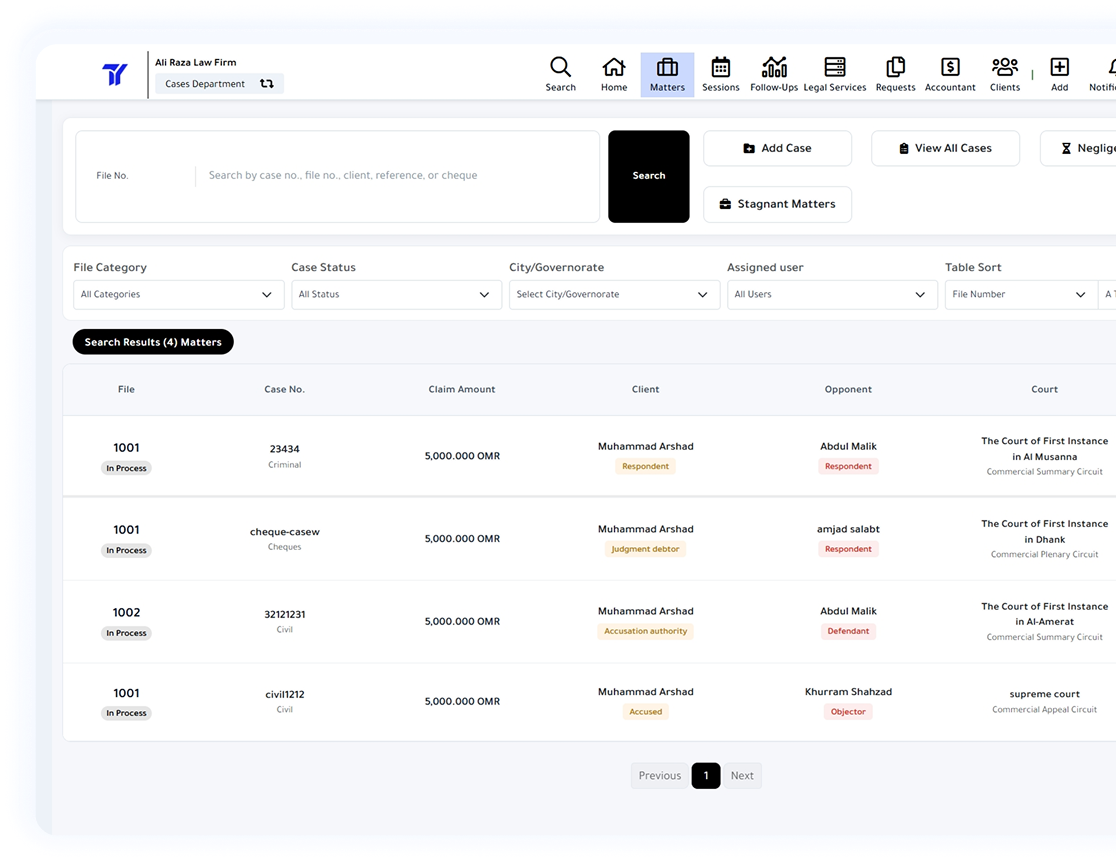
Manage your office’s matters with high accuracy, stay organized, keep matters complete and up-to-date and access all matters’ data at every stage in one centralized software without the need for assistance and without losing comprehensive knowledge of data centralization and clients.
Clients & Contacts
Track all data related to your clients, including all contact details, totally attached files, total fees, registered power of attorneys and contracts, with the ability to export a professional and comprehensive report covering details of all client matters with graphics and schedules.
All Procedures
Law Surface software provides all of the steps and procedures that result in a complete matter file in all aspects, as well as all of the data that can be printed, exported, or prepared for automatic mail templates, making it a practical and comfortable environment for lawyers.
Create Reports
More than 20 different reports can be created and exported as an Excel spreadsheet file with a single click using the drag and drop feature, which helps to organize the table before exporting. More than 160 data items can be exported as Excel spreadsheets.
Create a Completed Case File
All data relating to the case is Critical, and we make it Organized and professional
All Types of Claims
The Law Surface software contains all types of claims that any law firm works with, such as civil and execution cases, cheque cases, criminal cases, rental cases, mortgage cases, and general legal practice, and provides all claims’ requirements.
All Prerequisites
All required fields have been provided for all types of claims and can be added by file type without the need to see all fields in other types of claims. Our team also follows up on the court and government departments’ new requirements and adds them to the software.
Organizing Matters
The software provides a shortcut for each file type, allowing you to distinguish between many similar files of different types. The software also provides settings allowing you to specify the beginning of file sequence numbers and associate selected and various types of claims with a single sequence number.
Matter Transfer
When a matter in the Civil Cases department is concluded, it is transferred to the Execution Cases department with a single click, and Execution Cases department users receive email notification of new files added to the department. There is also an option to stay of the execution and complete the matter.


When Lawyers Become Developers
Perfect for all requirements and needs of lawyers in the Middle East
Weekly Sessions Roll
The Law Surface software automatically saves the week’s sessions roll with a single click in PDF file format. It is also possible to specify the order of the dates of the sessions on separate pages or in a row, with the ability to display or save the previous and upcoming sessions, as well as today’s sessions.
Advanced Search
The Law Surface software includes advanced search, which allows you to search for any entry made on any case file, such as a reference number, cheque number, real estate number, case number, or opponent’s name, etc.
Mailing Templates
One advantage of mail templates is that they save the lawyer time in preparing the content of the letter that he sends to the client regarding case file updates. Many ready-made email templates can be created, automatically generating the message with all of the data filled in, requiring the lawyer to copy and paste the content into the email software.
Full View
The Law Surface software displays all related procedures, related matters, execution files, fees, and all data related to the matter file on a single organized page. The grid view can be used to analyze the case history from the date of commissioning to the date of transfer to execution, taking into account all procedures and their dates.
Accountant for Law Firms
Legal Accounting and easy billing system
Create Invoices
Organize and simplify billing case fees accounting by creating invoices of specified fees with different designs, customized per the client’s request, with just one click. More than 160 items can be added to the invoice content, and the software saves all issued invoices with the daily backup.
Organizing Litigation Costs
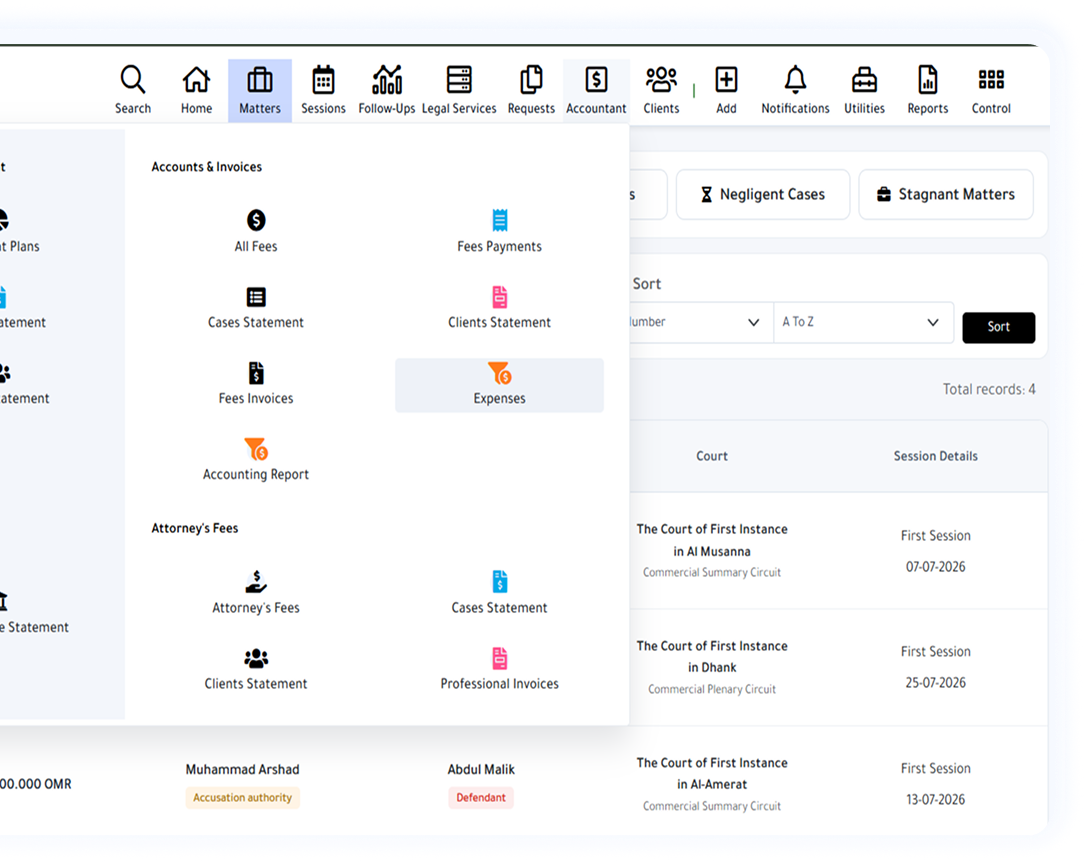
The software allows users to add fees and payments to the case file, allowing them to create an accounting report for litigation costs and invoices for each case separately or for all cases without the need for specialized accounting software.
Expense Accounting
Office expenses can be added to the software by modifying the expense category, which assists in determining all office expenses, such as salaries and internal and external expenses, thereby improving the comprehensive accounting report.
Comprehensive Accounting Report
The comprehensive accounting report summarizes all entries as total fees, tax, outstanding invoices, and net profits. The reporting period and the client can be specified.


Make sure to attend all meetings & Sessions
Mail and notification system helps Attorney to stay informed and attentive
Notifications
The software displays notifications at the top of the page, including reminders, job tasks, new files added to the implementation cases department, or meeting schedules based on reminding the user.
Meetings Reminder
The Law Surface software provides a meeting reminder feature that notifies the user of upcoming meetings via email or WhatsApp and provides the option to start the meeting from the software, end the meeting with a note, and track the duration of the meeting.
Sessions Reminder
Law Surface software provides the feature of adding a reminder of the next session’s date or a session meeting, with the option of sending the reminder to the user’s email or WhatsApp on the specified date to ensure no sessions are missed.
General Reminders
Add a general reminder to the case file using the reminder tool, specify the time and date, and have the option to send it to your email address or Whatsapp Number on the selected date.
Work brilliantly, not harder
Additional Law Surface Windows application helps you to organize files on your local server without modifying them
Desktop Application
The Law Surface application for Windows allows you to access the files of the local server and display them in the related case file by file number and case type from the local server; This provides quick verification of attachments for each case file in the Law Surface software.
View & Open Files
The Law Surface Windows application allows users to upload new attachments and rename files to the local server through the Law Surface software; this allows faster work and completion of all attachments for each matter file.
Automatic Folders
The Law Surface Windows application enables you to create automatic folders when adding a case through the Law Surface software. The names of the automatic folders formed when adding a new case file can be specified in the Law Surface software’s settings.
No Effects or Changes
Law Surface Windows application will not affect, change, or delete any of your existing files, nor will it reorganize the order of folders in your local server. You can specify the Attachments folder for existing matters, and the application will work on new topics in the same folder.


Access it from your office only or from anywhere
Select the best connection option between your Local Server or our Secured Cloud Server
Your Local Server
For Local Servers users, the Law Surface software runs on the local server independent of your internet connection. Internet connection is only required when software updates are released to add tools to lawyers’ work.
Secure Cloud Server
For Cloud Servers users, the Law Surface team with their highly experienced knowledge of web security and cybersecurity are working 24/7 to keep you relaxed so that your data is in a safe place with complete privacy of data access.
Maintain Confidentiality
Local Server users cannot access the software without connecting to the office’s local network. The same username cannot be used on multiple computers simultaneously, which means that cases and clients’ data will remain in your office.
High Download Speed
Law Surface software runs locally or on the cloud server providing users with high-speed data download where there is no more worry of waiting for the data or tables to load. This saves time and creates a practical environment.
Get better results now
Exclusive and modern features to keep pace with all Lawyers’ needs.
User-Friendly Interface
An easy-to-use interface that is easy to learn provides an ideal user experience that meets all of the requirements for faster access to all operations and shortcuts and the opportunity to view the most recent software updates.
Backup Feature
Law Surface provides an automatic backup feature with every update, eliminating the risk of losing data after each update. Backups are also provided on a daily, weekly, and monthly basis to ensure that no data is lost.
Premium Support
The Law Surface team provides unparalleled support; all users can get help via communication software, the phone, or the form. The Law Surface software also provides shortcuts to launch this software through Law Surface, allowing lawyers to access it easily.
Periodic Updates
The Law Surface team follows up on all government updates, changes, and user feedback, then studies and incorporates it into the software to offer the best user experience and unrivalled data quality.


Access it from your office only or from anywhere
We build more features to increase your Clients Trust in your services
WhatsApp Sharing with clients
You can share the update of the session or the new procedures on the case file via WhatsApp with the client with the click of a button and without the need to write a message or search for the client’s number every time the case file is updated, with the possibility of designing the message and using more than 160 elements of the lawsuit data.
Share Case File Link
You can now relax from sending lawsuit updates to the client by sending the lawsuit file link to the client, so the client can see the latest updates on the lawsuit file in a limited and legal way
Ready Messages
The Law Surface Software provides ready-made WhatsApp messages that can be modified and added to provide you with an updated message for the lawsuit file with the click of a button and with the availability of the feature of opening a WhatsApp conversation with the client also with the click of a button
Print Client Profile
The client’s profile contains all lawsuits, fees, contracts and POAs of the client, with a simplified and detailed chart and table display to provide a professional profile print at the click of a button with the ability to specify the date range of the report.
Organized & Integrated Management
Manage all cases in your office with the professionalism and efficiency
Learn more about Law Surface Features
WhatsApp Notifications
Smart Alerts
Friendly Design
Time Saver
Ready-To-Go
Support Hijri Date
Up-To-Date
Premium Support
Ready to Get Started?
Simplify your legal operations and grow your firm with powerful, user-friendly analytics from Law Surface.
- 14-Days Free Trial
- No Credit Card
- Quick Start